Google Ad Copywriting: How to Write Search Ads That Get More Clicks
Google Ad copywriting is the secret weapon behind every profitable pay-per-click (PPC) campaign in the tech industry. Every single day, millions of potential customers type their most urgent business problems directly into Google. Therefore, if your search ad fails to grab their attention immediately, your competitors will gladly take their clicks and their money.
However, writing persuasive text inside strict character limits is much harder than it looks at first glance. Specifically, you only have a few short headlines and descriptions to prove that your solution is the best choice on the page. In this complete guide, you will learn the exact system for Google Ad copywriting that increases your click-through rate (CTR) and lowers your cost per click (CPC).
Furthermore, we will break down the anatomy of Responsive Search Ads, psychological triggers that drive immediate action, and how to test your messaging like a pro. As a result, you will have a repeatable blueprint to turn high-intent searchers into loyal paying customers.
What Is Google Ad Copywriting and Why Does It Matter?
At its core, Google Ad copywriting is the art and science of writing concise, action-oriented text for paid search engine placements. Unlike social media ads that interrupt people while they browse photos, search ads appear at the exact moment someone looks for an answer. Consequently, your copy does not need to create demand from scratch; instead, it must capture existing search intent.
Specifically, strong PPC copywriting directly impacts a critical metric inside your account called Quality Score. Google grades your ads based on expected click-through rate, ad relevance, and landing page experience. Therefore, better Google Ad copywriting earns you a higher Quality Score, which rewards your business with lower costs per click and higher ad positions.
Moreover, well-crafted search ad copy acts as a filter that qualifies your website traffic before you ever pay for a click. For example, stating your exact software pricing or target company size in the description keeps incompatible bargain hunters from clicking. Ultimately, strategic Google Ad copywriting protects your marketing budget while attracting buyers who are ready to convert.
The Anatomy of a Modern Google Search Ad
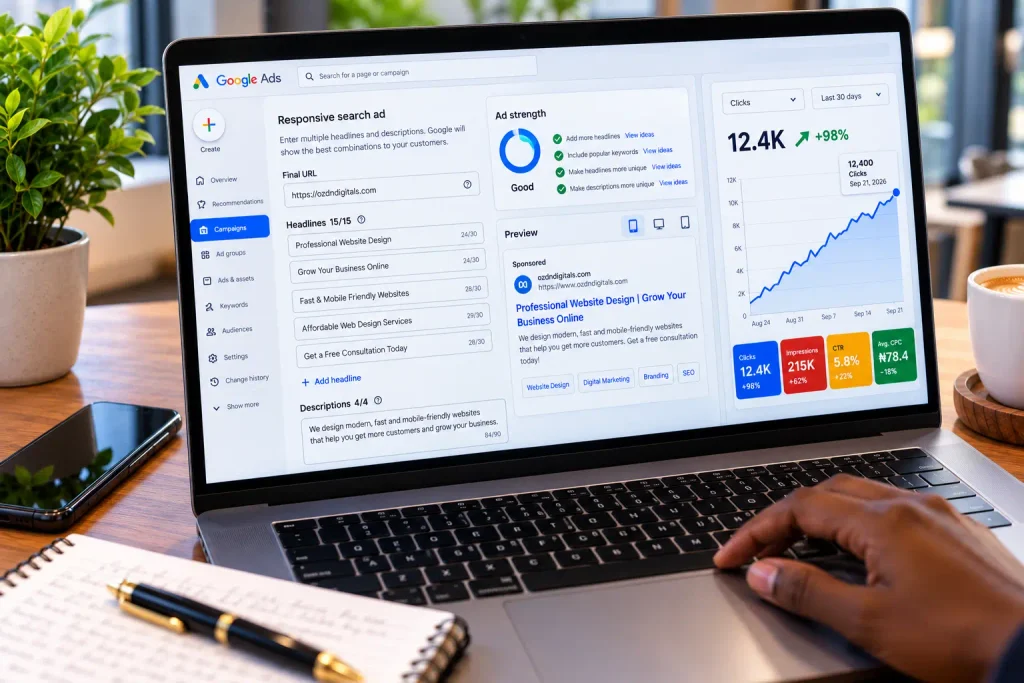
Before you start writing Google search ads, you must understand how Responsive Search Ads (RSAs) work on the platform today. Instead of writing a single static ad, Google Ad copywriting now requires feeding Google’s machine learning system multiple text assets that it mixes and matches automatically.
1. The Headlines (Up to 30 Characters Each)
First, headlines are the bold blue links at the very top of your search placement. Google allows you to enter up to 15 different headlines per ad, and it displays up to three of them at a time. Because each headline has a strict 30-character limit, every single syllable must earn its place.
Specifically, your headlines do the heavy lifting in Google Ad copywriting because busy users rarely read every word on the results page. Therefore, you should dedicate your first few headlines to matching the user’s exact search keyword, while using the remaining slots to highlight core benefits and calls to action.
2. The Descriptions (Up to 90 Characters Each)
Second, descriptions appear right below your headlines in regular body text. You can provide up to four distinct descriptions of 90 characters each, and Google displays up to two of them depending on screen size. Consequently, this space allows you to expand on your value proposition and overcome common buyer objections.
For instance, while your headline claims “Automated Cloud Backup for Teams,” your description can explain how the setup takes five minutes with zero coding required. In addition, effective Google Ad copywriting treats each description as a standalone pitch so any combination reads smoothly.
3. The Display Path Fields (Up to 15 Characters Each)
Third, the display URL shows users where they will land after clicking your advertisement. Although the root domain must match your website, Google gives you two customizable 15-character path fields right after the slash.
Smart marketers use these path fields as bonus real estate for Google Ad copywriting. For example, displaying [yourbrand.com/Cloud-Backup/Free-Trial](https://yourbrand.com/Cloud-Backup/Free-Trial) immediately reinforces relevancy and tells the prospect exactly what to expect on the destination page.
4. Ad Assets (Formerly Ad Extensions)
Finally, ad assets are extra snippets of information—such as sitelinks, callouts, and structured snippets—that expand your ad’s physical footprint on the screen. Even though many beginners overlook them, writing sharp ad assets is a vital part of Google Ad copywriting. Specifically, adding four sitelinks and four callouts pushes rival ads further down the mobile screen and gives users more reasons to choose your brand.
7 Golden Rules for High-Converting Google Ad Copywriting
Writing thirty-character headlines that beat the competition requires a clear, disciplined method. Apply these seven proven rules to elevate your Google Ad copywriting across every campaign you manage.
1. Mirror the Searcher’s Exact Keyword and Intent
First and foremost, people click on results that mirror the exact words they just typed into the search bar. When a prospect searches for “payroll software for small tech startups,” a generic headline that says “Business Accounting Solutions” feels disconnected.
Therefore, rule number one of Google Ad copywriting is placing your primary target keyword directly into Headline 1 and Description 1. Furthermore, Google automatically bolds words in your description that match the user’s search query. As a result, matching search intent makes your ad visually pop off the screen and signals instant relevance.
2. Focus on Tangible Outcomes Over Technical Features
In the tech and SaaS world, advertisers often pack their ads with complicated jargon and feature lists. However, frustrated searchers do not want to buy a tool; they want to solve an urgent problem and get back to their day.
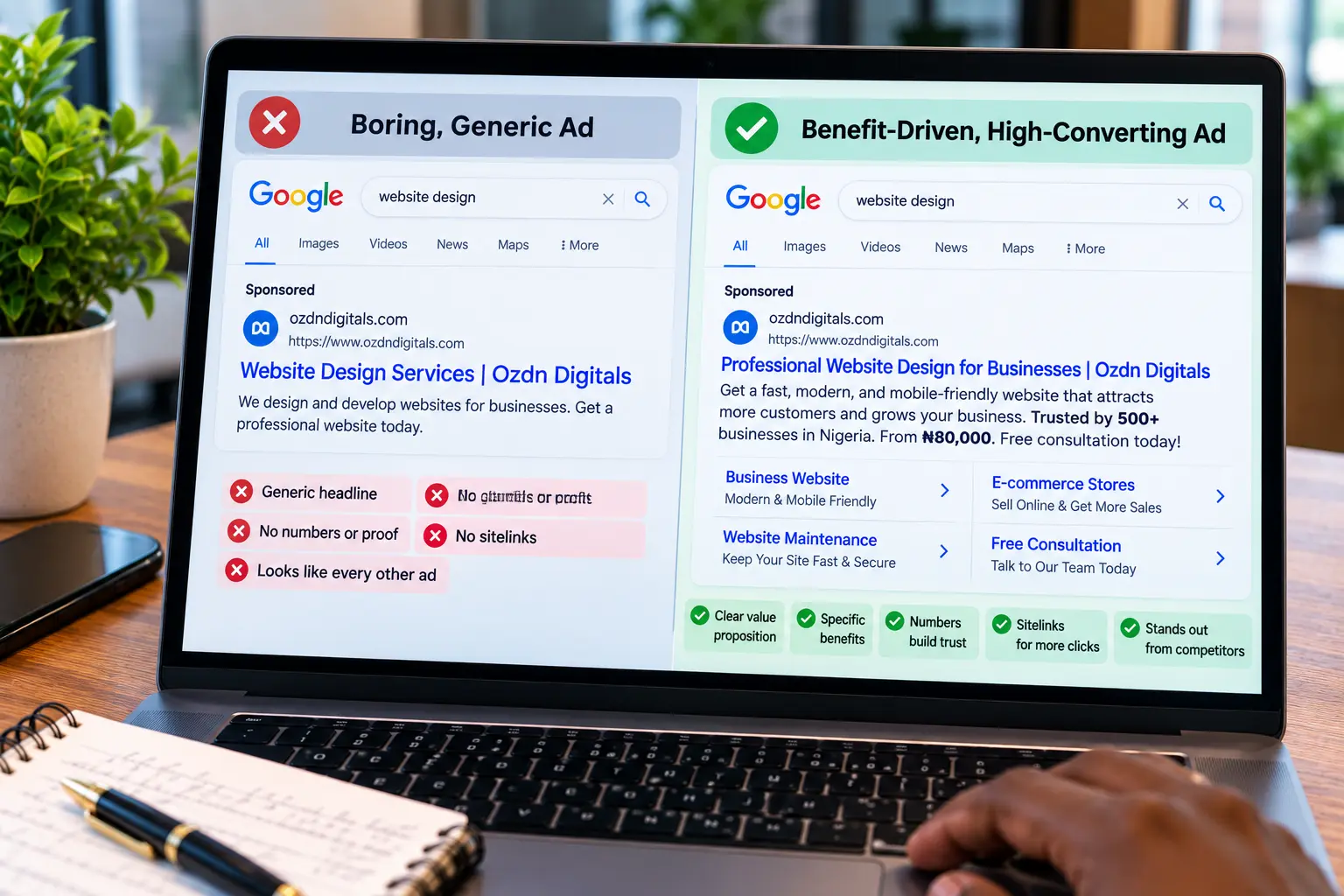
Specifically, great Google Ad copywriting translates cold product features into emotional or financial benefits. Let us look at how you can transform dry technical specs into magnetic paid search ad text:
- Weak Feature Copy: “Includes AI-Powered Automated Scheduling & Calendar Sync.”
- Strong Benefit Copy: “Eliminate Back-and-Forth Emails & Book 2x More Demos.”
- Weak Feature Copy: “24/7 Cloud Server Monitoring With Instant Alerts.”
- Strong Benefit Copy: “Fix Server Downtime Before Your Customers Ever Notice.”
Consequently, leading with the final result makes your offer irresistible to busy decision-makers.
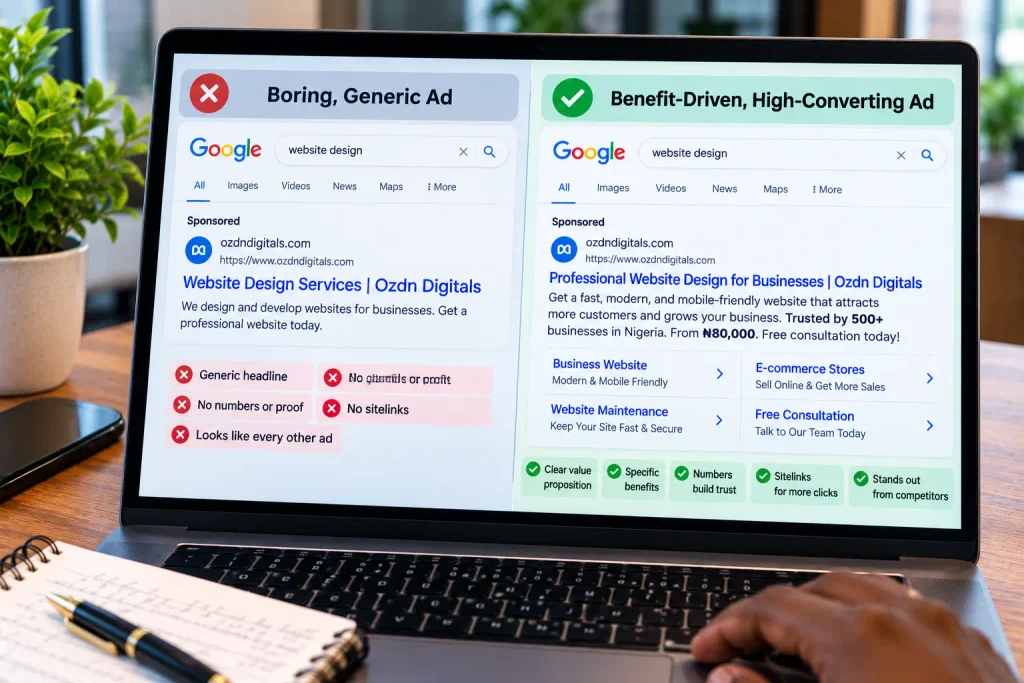
3. Pack Your Headlines With Specific Numbers and Data
Vague superlatives like “Best,” “Fastest,” or “Leading” have lost all meaning in online advertising. Because every company claims to be number one, skeptical buyers simply ignore empty bragging.
Instead, anchor your Google Ad copywriting with concrete numbers, exact pricing, and verifiable statistics. [External Link Suggestion: Link to an authoritative PPC study from WordStream or Search Engine Land showing that search ads containing specific numbers and statistics achieve significantly higher click-through rates than vague ads.] For example, write “Trusted by 14,500+ Developers” or “Plans Starting at $19/Mo.” Specifically, exact digits act as visual pattern interrupts amidst a sea of text and build immediate credibility.
4. Create Diverse Headlines for Responsive Search Ads
One of the biggest mistakes advertisers make with Responsive Search Ads is writing 15 nearly identical variations of the same headline. If all your headlines say “Best CRM Software,” “Top CRM Software,” and “Leading CRM Software,” Google’s algorithm ends up showing redundant, robotic combinations.
To master modern Google Ad copywriting, divide your 15 headline slots into four distinct categories:
- Keyword Headlines (3–4 slots): Match the exact search query and close variants.
- Benefit & Outcome Headlines (4–5 slots): Focus on time saved, revenue gained, or headaches removed.
- Trust & Social Proof Headlines (3–4 slots): Mention customer counts, star ratings, or years in business.
- Call-to-Action Headlines (2–3 slots): Tell the user what to do next, such as “Start Your 14-Day Free Trial.”
By giving the algorithm genuinely diverse building blocks, every possible ad combination reads like a balanced, persuasive sales pitch.
You might also like :
Choosing the Right Digital Platforms,
Why the PAS Copywriting Formula Outperforms Others
5. Use Pinning Strategically and Sparingly
Inside the Responsive Search Ad editor, Google lets you “pin” specific headlines or descriptions to Position 1, 2, or 3. However, pinning every single asset restricts machine learning and dramatically lowers your Ad Strength score.
Therefore, smart Google Ad copywriting only uses pinning when legal compliance or strict message clarity requires it. For example, if you want to guarantee that your primary keyword always appears first, pin two or three keyword headlines to Position 1 while leaving the remaining positions unpinned. Consequently, you maintain control over your opening hook while still letting Google test winning combinations.
6. Pre-Qualify Clicks to Protect Your Budget
Interestingly, the goal of Google Ad copywriting is not always to get the highest click-through rate possible from everyone. Remember, you pay Google every single time someone clicks your link, whether they buy from you or not.
Therefore, if you sell an enterprise cybersecurity solution that costs $2,000 per month, you do not want students or freelancers clicking your ad looking for free tools. By including qualifying copy like “For Teams of 50+ Employees” or “Enterprise Plans From $2k/Mo,” you intentionally repel bad-fit clicks. As a result, your conversion rate climbs and your sales team only talks to qualified leads.
7. Use Title Case and Emotional Power Words
Formatting plays a surprisingly large role in how quickly users process paid search ad text. Specifically, writing your headlines and descriptions in Title Case—where the first letter of every major word is capitalized—makes your ad look cleaner, more authoritative, and easier to scan.
In addition, sprinkle high-intent power words into your Google Ad copywriting to create urgency and reduce buyer friction. Words like Instant, Effortless, Proven, Guaranteed, Step-by-Step, and No-Risk tap into human psychology and nudge hesitant searchers to click your link right now.
Psychological Triggers That Boost Search Ad Clicks
Even in technical B2B industries, human beings make clicking decisions based on emotion before justifying them with logic. Incorporating these three psychological principles into your Google Ad copywriting will give you an immediate edge over competitors.
Loss Aversion and Risk Reversal
First, behavioral psychology proves that people are twice as motivated to avoid losing something as they are to gain something of equal value. When someone searches for a new software provider or agency, their biggest fear is wasting money or making a bad decision.
Consequently, you can supercharge your Google Ad copywriting by emphasizing risk reversal right in the description. Phrases like “100% Money-Back Guarantee,” “No Credit Card Required,” or “Cancel Anytime in One Click” eliminate the fear of loss and make clicking feel completely safe.
Specificity and the Illusion of Effortless Speed
Second, modern consumers want results yesterday, and they hate complicated onboarding processes. Whenever you combine a specific timeframe with an effortless action in your Google Ad copywriting, click-through rates surge.
For instance, compare “Sign Up for Our Website Builder” with “Launch Your Custom Website in 10 Minutes—Zero Coding Needed.” The second option paints a crystal-clear picture of speed and simplicity that busy entrepreneurs cannot resist.
Competitor Comparison Angles
Third, some of the highest-converting search campaigns target people who are actively searching for a competitor’s brand name or looking for “alternatives.” When writing Google Ad copywriting for competitor campaigns, never use your rival’s trademarked name inside your actual headline text, as that violates ad policies.
Instead, acknowledge their intent indirectly with headlines like “Looking for a Faster Alternative?” or “Switch & Save 30% on Your Annual Plan.” This approach intercepts dissatisfied users at the exact moment they are ready to switch providers.
Common Google Ad Copywriting Mistakes to Avoid
Even experienced digital marketers occasionally fall into traps that hurt their ad relevance and waste ad spend. Keep your campaigns profitable by avoiding these three common Google Ad copywriting errors.
1. Abusing Dynamic Keyword Insertion (DKI)
Dynamic Keyword Insertion is a feature that automatically swaps the user’s exact search query into your headline. While DKI sounds helpful in theory, relying on it blindly can ruin your Google Ad copywriting.
Specifically, if your keyword list includes misspelled words, awkward phrasing, or competitor names, your ad will look broken or spammy. Furthermore, if a search query exceeds the 30-character limit, your default fallback text appears instead. Therefore, only use DKI on tightly grouped ad sets where every single keyword reads naturally inside your headline sentence.
2. Breaking Message Match With Your Landing Page
Your search ad does not exist in a vacuum; it is simply the bridge to your website. One of the deadliest mistakes in Google Ad copywriting is promising a specific offer in the ad and sending the user to a generic homepage.
For example, if your ad headline promises a “Free Website SEO Audit Tool,” the landing page headline must immediately present that exact tool above the fold. Maintaining strict message match reassures the visitor that they are in the right place, boosts your conversion rate, and improves your Google Quality Score.
3. Violating Google Editorial and Punctuation Policies
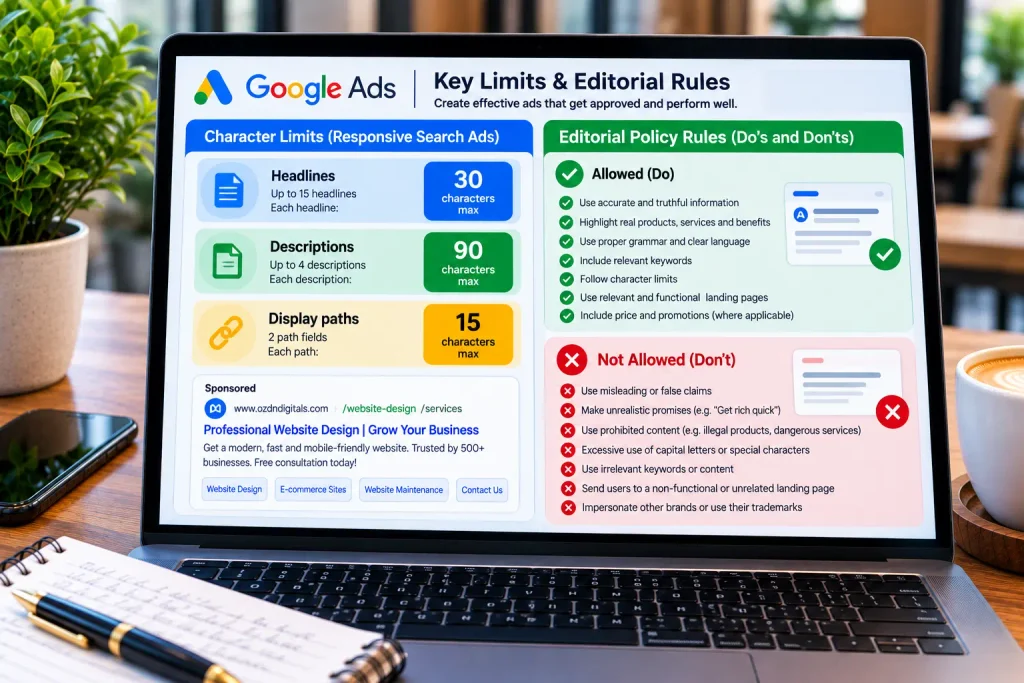
Google enforces strict editorial standards to keep the search results page looking clean and trustworthy. If you ignore these formatting rules during your Google Ad copywriting process, your ads will get disapproved immediately.
Specifically, keep these formatting rules in mind:
- No Excessive Capitalization: Never write words in ALL CAPS (like “FREE” or “BEST”), except for recognized acronyms like “SEO,” “PPC,” or “CRM.”
- No Exclamation Marks in Headlines: Google strictly prohibits exclamation points inside any headline slot, and allows only one exclamation mark per description.
- No Gimmicky Symbols: Avoid using asterisks, emojis, or repeated punctuation like “???” to draw artificial attention.
How to Audit and Test Your Search Ad Copy
Great copywriters never guess which headline will win; they let real customer data make the final decision. Once your campaigns are live, follow a structured routine to optimize your Google Ad copywriting every month.
First, open the “Asset Details” report inside your Responsive Search Ads after your campaign has gathered at least 2,000 impressions. Google assigns performance ratings—such as Low, Good, or Best—to each individual headline and description asset.
Next, pause the two or three assets labeled Low and replace them with fresh variations inspired by your Best performers. For instance, if your top-performing headline focuses on speed, write two new speed-focused angles to test against it. Over time, this continuous optimization loop turns good Google Ad copywriting into an unbeatable competitive advantage.
Conclusion: Write Search Ads That Win the Click
In summary, winning on the search results page requires much more than bidding the highest amount per click. Mastering Google Ad copywriting means aligning your headlines with exact search intent, translating complex features into clear customer benefits, and backing up every claim with specific numbers and risk reversal. Furthermore, structuring your Responsive Search Ads with diverse headline categories and strong ad assets ensures your message stands out on any screen size.
Ultimately, every character counts when you are competing for high-intent buyers on Google. By applying the frameworks, formatting rules, and testing habits covered in this guide, you can transform your Google Ad copywriting into a reliable engine for lower acquisition costs and higher sales.
Ready to improve your search ad click-through rates this week? Drop a comment below with the biggest challenge you face when writing within the 30-character headline limit, or share this guide with a fellow marketer running PPC campaigns!